

Shumoku
Network diagrams that don’t drift away from reality.
Shumoku generates readable network topology maps from structured network data.
Network diagrams should not be static drawings that slowly become outdated. They should be reproducible, updateable, and grounded in a source of truth.
Shumoku turns YAML, NetBox, LLDP, SNMP, and other topology data into diagrams that reflect how the network actually exists.




[!NOTE] 製作者が janog58 NOC に参加中です。導入支援・技術サポートはお気軽にご相談ください。 📧 contact@shumoku.dev · 𝕏 @shumoku_dev
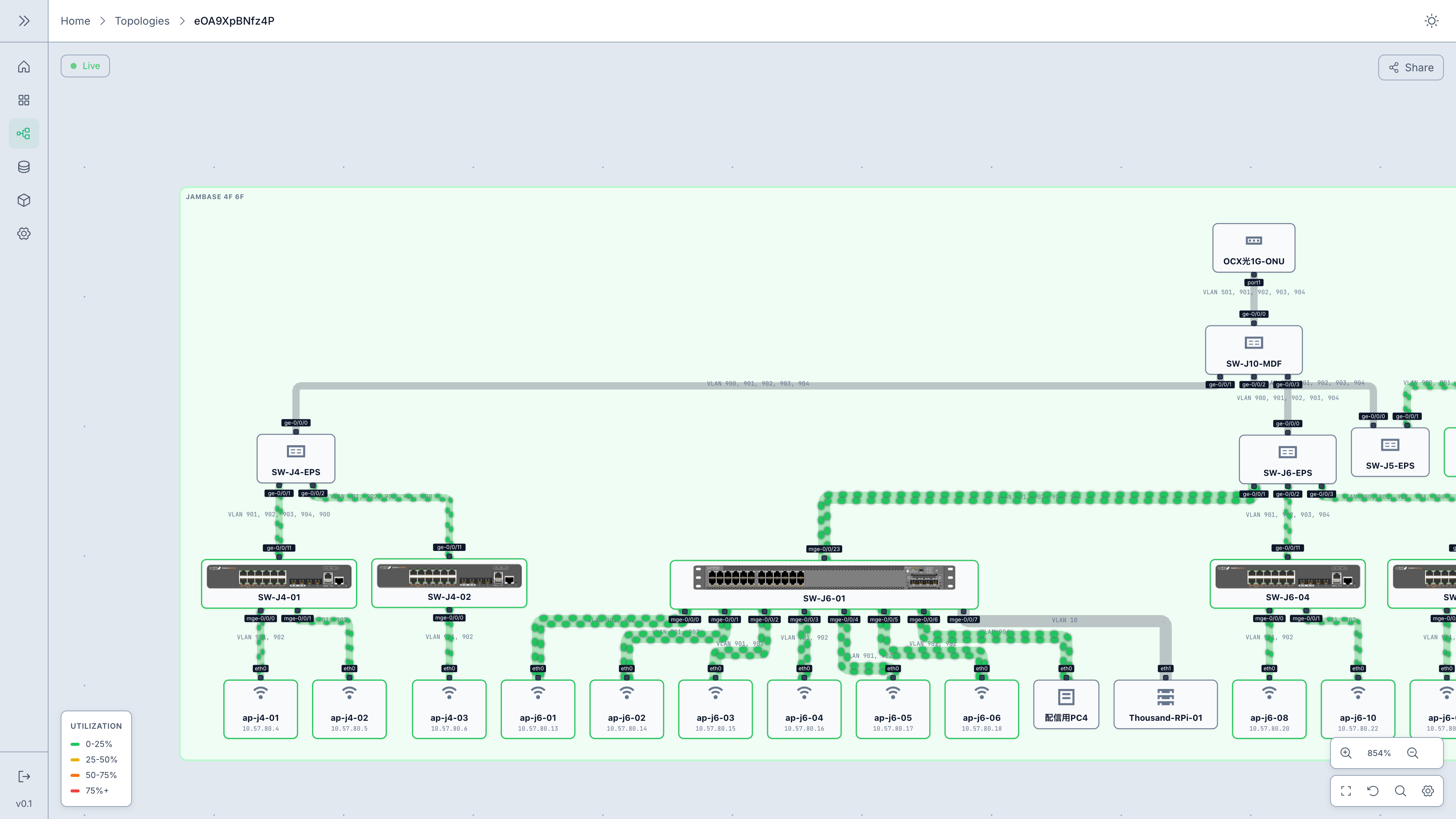
Live weathermap — real-time traffic overlaid on the topology |
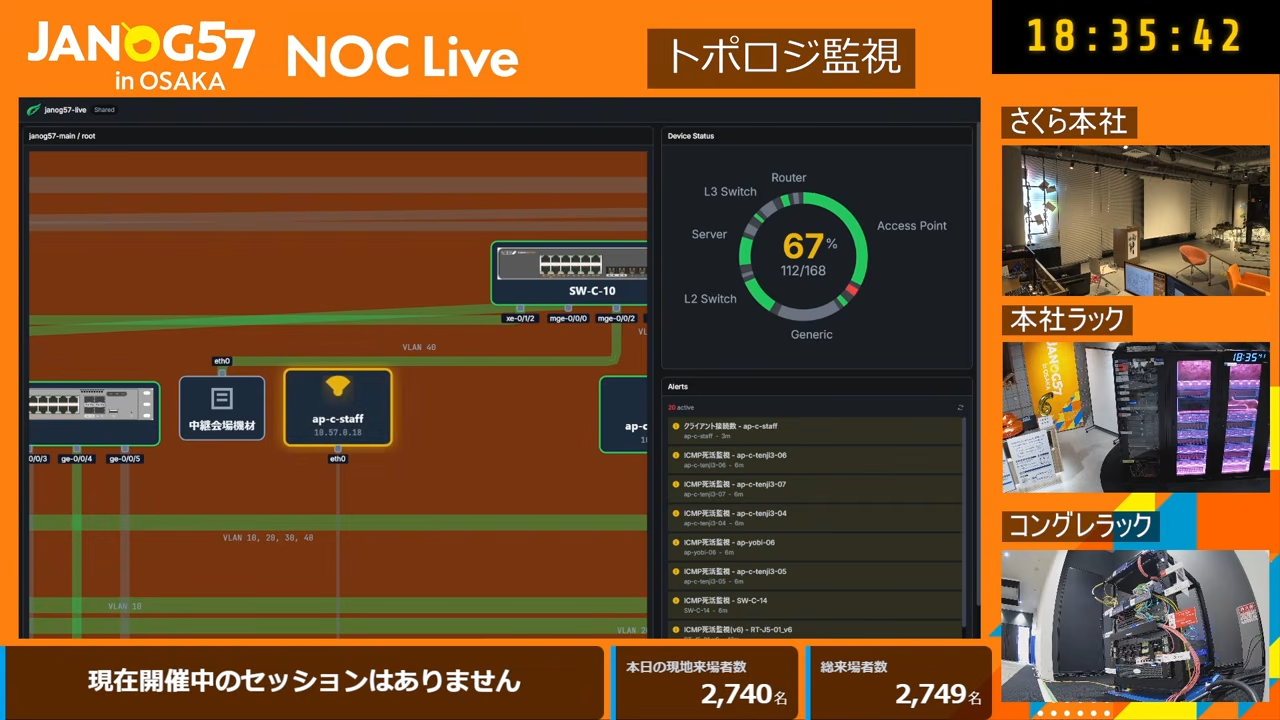
Dashboard in production — JANOG57 NOC Live |
Philosophy
Networks need maps, too. ネットワークにも、地図が必要だ。
Network diagrams are one of the most important tools in network operations. But in many environments they are still drawn by hand, updated manually, and slowly drift away from the real network.
Shumoku starts from three principles.
1. A diagram should be readable
A topology map should make the structure of the network understandable at a glance — the relationships, layers, paths, and points of failure.
2. A diagram should be trustworthy
A diagram is only useful when it reflects reality. Shumoku generates diagrams from structured data — YAML, NetBox, LLDP, SNMP — instead of relying on manual drawing alone.
3. A diagram should be updateable
Networks change. Diagrams should be regenerated, reviewed, and maintained as part of the operational workflow.
Shumoku treats network diagrams not as static pictures, but as generated views of the network — close to the source of truth, and easy to keep that way.
→ Read the full design philosophy.
What’s in the box
At its core, Shumoku is a topology generation engine — it turns structured network data into a readable diagram. Around that core, it ships ready-to-use apps:
| 📦 Library + CLI | The core engine — turn a network YAML into SVG / HTML / PNG, in Node or the browser | libs/shumoku |
| ✏️ Editor | Visual topology designer built on the engine — lay out devices, modules, and cables; derive a bill of materials | apps/editor |
| 🖥️ Server | Topology-based monitoring built on the engine — overlay live metrics and alerts on the map, build dashboards, share read-only links | apps/server |
Features
- Live weathermap — Overlay real-time traffic utilization on links, color-coded by load
- Alert visualization — Show active alerts from Zabbix, Prometheus, and Grafana on topology
- Auto-generate from NetBox — Pull devices and cables from NetBox to build topology automatically
- Network discovery — Seed-crawl SNMP + LLDP to discover topology with no inventory at all
- Interactive dashboards — Pan and zoom the whole network, drawn on one page, in the browser
- 900+ vendor icons — Yamaha, Aruba, AWS, Juniper, and more — rendered at correct aspect ratios
- Shareable links — Publish topology views with a share token — no login required
Server
The server is the full platform: a Bun + Hono API with an SQLite store and a SvelteKit web UI. Run it from the published Docker image, or build from source.
See the Server Setup Guide for Docker, Kubernetes (Helm), systemd, and manual deployment.
# Published Docker image (quickest)
install -d -m 700 .shumoku
openssl rand -base64 32 > .shumoku/admin-password
chmod 600 .shumoku/admin-password
docker run -d -p 8080:8080 -v shumoku-data:/data \
  -v "$PWD/.shumoku/admin-password:/run/secrets/shumoku_admin_password:ro" \
  -e SHUMOKU_BOOTSTRAP_ADMIN_PASSWORD_FILE=/run/secrets/shumoku_admin_password \
  ghcr.io/konoe-akitoshi/shumoku:latest
# → http://localhost:8080   (add `-e DEMO_MODE=true` to preload a sample network)

# Docker Compose with an exact production version
cd apps/server && SHUMOKU_VERSION=0.1.1 docker compose up -d

# Development from source (API :8080 + web UI :5173)
bun run dev:server     # from the repo root
What you can do:
- Create topologies — Upload YAML files or write them in the built-in editor
- Connect data sources — Link Zabbix, Prometheus, or NetBox to pull live metrics
- Monitor in real-time — See node status and link utilization update live over WebSocket
- Build dashboards — Combine multiple topologies and metric widgets into custom views
- Share — Generate public links for read-only access without authentication
Editor
The Editor is hosted on Vercel independently from
the Server. Branches and pull requests receive isolated Preview deployments;
merging to main updates Production. The running version, deployment channel,
and commit are shown on the Editor home screen.
Integrations
| Source | What it pulls |
|---|---|
| Zabbix | Traffic metrics, host status, LLDP topology, and alerts via JSON-RPC |
| Prometheus | SNMP / node-exporter metrics for link utilization, hosts, and Alertmanager alerts |
| NetBox | Topology and hosts auto-discovered from DCIM / IPAM |
| Grafana | Alerts via webhook or Alertmanager |
| Aruba Instant On | Access points, switches, and site alerts from the cloud portal |
| Network scan | Topology discovered by SNMP + LLDP seed-crawl, no inventory required |
| REST API | Render topologies and fetch metrics programmatically from your own tools |
See Plugin Authoring to write your own data source.
YAML format
name: Simple Network

groups:
  - id: core
    label: Core Layer

nodes:
  - id: rt-01
    label: Router 01
    type: router
    product: yamaha/rtx3510
    group: core

  - id: sw-01
    label: Switch 01
    type: l3-switch
    group: core

links:
  - endpoints:
      - { node: rt-01, port: lan1 }
      - { node: sw-01, port: ge-0/0/0 }
    speed: 10G
The theme is not set in the YAML: choose it with --theme dark on the CLI, or renderNetworkSvg(model, { theme }) in code.
Library
The rendering engine is also published to npm as standalone packages.
npm install shumokuimport { readNetworkModel, renderHtml } from 'shumoku'
const model = readNetworkModel(yamlString)
// Interactive HTML (pan / zoom / tooltips)
const html = renderHtml(model, { title: 'My Network' })Need SVG or PNG instead? Use the dedicated renderers:
import { renderNetworkSvg } from '@shumoku/renderer-svg'
import { renderNetworkPng } from '@shumoku/renderer-png' // Node.js only

const svg = renderNetworkSvg(model)
const png = await renderNetworkPng(model, { scale: 2 })
CLI
npx @shumoku/cli render network.yaml -o diagram.svg
npx @shumoku/cli render network.yaml -f html -o diagram.html
npx @shumoku/cli render network.yaml -f png -o diagram.png --scale 3Packages
| Package | Path | Description |
|---|---|---|
shumoku | libs/shumoku | All-in-one — core + SVG/HTML renderers |
@shumoku/core | libs/@shumoku/core | Models, YAML reader, the drawing engine (drawNetwork), themes, plugin kit |
@shumoku/renderer-svg | libs/@shumoku/renderer-svg | Thin wrapper: re-exports @shumoku/renderer/static (renderNetworkSvg, renderSceneSvg, drawNetworkScene) plus renderGraphToSvg and icon fetch helpers |
@shumoku/renderer-html | libs/@shumoku/renderer-html | Interactive HTML output |
@shumoku/renderer-png | libs/@shumoku/renderer-png | PNG output (Node.js, via resvg) |
@shumoku/renderer | libs/@shumoku/renderer | Canonical Svelte + static SVG renderer |
@shumoku/catalog | libs/@shumoku/catalog | Device / service catalog (vendor, model, sysObjectID) |
@shumoku/plugin-sdk | libs/@shumoku/plugin-sdk | HTTP client + pagination for data-source plugins |
@shumoku/cli | apps/cli | shumoku render command-line tool |
Data-source plugins live in libs/plugins: zabbix, prometheus, netbox, grafana, aruba-instant-on, network-scan.
Repository layout
apps/
  server/   Real-time monitoring platform — Bun + Hono API, SvelteKit web UI
  editor/   Visual topology designer — SvelteKit + xyflow
  cli/      Render YAML → SVG / HTML / PNG
  docs/     Documentation site (Astro)
libs/
  shumoku            All-in-one npm package
  @shumoku/*         Core engine, renderers, catalog, plugin SDK
  plugins/*          Data-source integrations
docs/                Architecture, plugin authoring
examples/            Sample YAML networks + a sample plugin
Each top-level directory has its own index: apps/ · libs/ · examples/.
Documentation
- Server Guide — Setup, data sources, dashboards
- YAML Reference — Full YAML syntax
- Vendor Icons — Available icons
- Playground — Try without installation
- Architecture — Monorepo overview, load pipeline, drawing engine
- Plugin Authoring — Writing a
DataSourcePlugin: capability mixins, data shapes, severity mapping
Development
git clone https://github.com/konoe-akitoshi/shumoku.git
cd shumoku
bun install
bun run build      # build all libraries (excludes the server app)
bun run dev        # run everything in dev mode
Common scripts: bun run test, bun run lint, bun run typecheck, bun run format.
This is a Bun workspaces + Turborepo monorepo — see CONTRIBUTING.md.
Star History
Community & governance
Shumoku is an open-source project led by @konoe-akitoshi. Contributions are welcome under the AGPL-3.0 license.
- Contributing — dev setup, pull requests, DCO sign-off
- Governance — roles, decision-making, releases
- Support — community help on GitHub · Commercial support — paid implementation / integration services
- Code of Conduct · Security · Brand guidelines · Name & logo story (日本語)
License
Shumoku is free and open-source software, licensed under AGPL-3.0 (LICENSE).
For enterprise use, we provide paid commercial support and implementation services (deployment, NetBox/Zabbix integration, PoC, custom plugin development, priority handling) — separate from the open-source license, in collaboration with our commercial support partner. See COMMERCIAL_SUPPORT.md, or reach out at contact@shumoku.dev. If AGPL-3.0 does not fit your use case, contact us to discuss the options.